

Alerts
An alert is a record NoticeOS raises when a number on a site, or in NoticeOS's own collection, is unlikely to be normal, with the evidence attached. The Alerts page lists every open alert until it is fixed, snoozed or marked read. Why one fires is in Alerts.
The Alerts page shows what needs attention right now, and how serious it is.
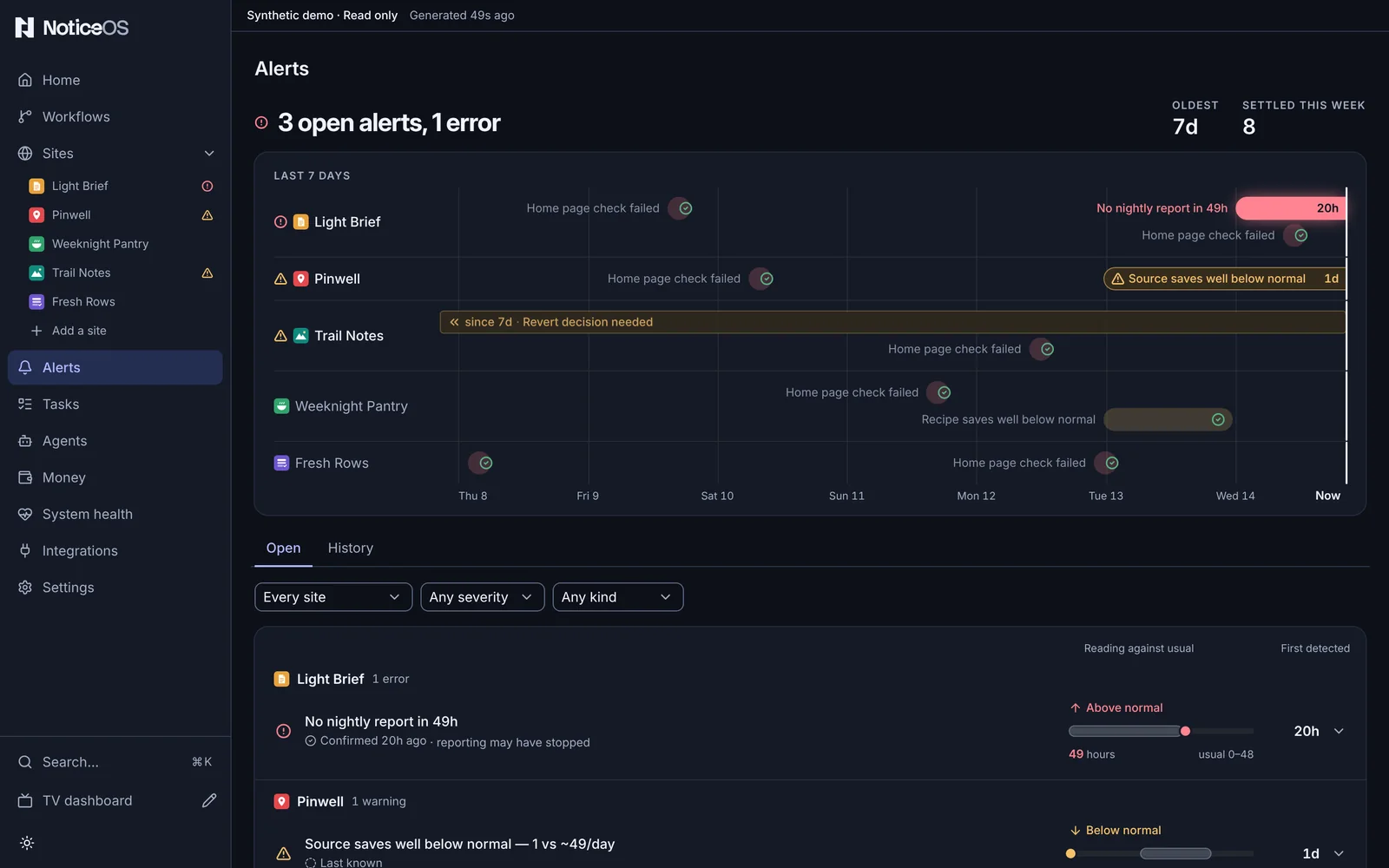
What you see
The page starts with a one-line summary and a severity dot: 2 open alerts, both warnings, or All clear. Beside it, Oldest shows how long the oldest open alert has been open and Settled this week counts what was resolved or acknowledged in the last seven days.
Under the summary, Last 7 days draws the same alerts on a time axis that ends at Now: one row per site, every open alert a bar from when it was first detected to now, and what settled this week a pale closed bar with a green tick. A bar that started more than a week ago is cut at the left edge with its age on it (since 37d). The newest open error has a faint red glow. Press an open bar to jump to its row below, expanded; press a closed bar to see that site's settled alerts. Like the summary, the chart covers every site: the filters narrow the list, not the chart.
Two tabs follow: Open and History. Open lists the alerts still open; History lists every settled alert.
Filters are above the list: a site, a severity (Any severity, Errors, Warnings; History adds Info) and a kind (Any kind, Anomalies, Opportunities). When a filter narrows the list, the list shows how many of the open alerts it includes (3 of 10 open).
The Open list is one board, grouped by site, the site with the worst and newest alert first; each site's heading names it and counts its errors and warnings. Each row describes what happened, and its verb shows which direction is good, with a shape for severity (a circle for an error, a triangle for a warning) and how long ago it was first detected. Where the rule that fired has a normal range, the row draws the reading against it: the usual range as a shaded band, the reading as a dot, Below normal or Above normal in words, and the figures under it (19 in 24h, usual 41–77). A metric's usual range is the counts its own rule would not have fired on; a late nightly report is shown against the hours the rule allows; a GA4 quota against the share below which the rule fires. A rule with no range (a failed fetch, a sitemap check) has none drawn. The statistics are under Evidence in the expanded row, and a condition checked on several nights is drawn as one bar per night against its usual level.
Alerts open for over a week are collapsed under Open for over a week, one line naming each and its site, so an old fault is never shown as prominently as a new one. When they are all that is open, they are listed under that heading, not collapsed.
The list ends with That's every open alert. and the age of the data. Under it, a Snoozed panel lists alerts you snoozed, each with when it comes back.
History lists settled alerts, newest first, each with its site, what was decided (Acknowledged, resolved 2d ago) and how long it stayed open, 25 to a page with Newer and Older.
Every alert has two separate fields. Severity is how urgent: error, warn or info; only these three use the attention colours. Kind is what sort of thing it is: an anomaly (something moved when it should not have), an opportunity (something worth acting on) or a milestone (a win). A milestone is always info-severity, so it never appears in the Open queue; it shows on Home and in History. A green card marks a win; it does not mean that all is well.
What you can do
Each action is on the row it applies to. On a computer with a mouse, Snooze and Resolve appear at the end of a row when you point at it or move to it with the keyboard; on a phone or a touch screen they are under each row.
- Snooze moves the alert to the Snoozed panel for a few days or until a date (Snooze until date). It returns to the Open list automatically.
- Unsnooze, in the Snoozed panel, returns a snoozed alert to the Open list early.
- Resolve closes it.
- Mark read, after opening the row for the evidence, acknowledges it without closing it.
- Tune adjusts the rule that fired it. Tuning opens the same two settings as Settings > Alert rules (Anomaly sensitivity and Longest window), with a replay of what the new value would have fired.
- File task, in the opened row, files a task about the condition; the alert stays open until the condition clears.
- Open the site, from the opened row or from the site's heading.
- The filters narrow the list by site, severity and kind.
A metric is tested against the mean of its four matching prior weekdays, so a Saturday is compared with Saturdays. A metric averaging 4.6 or more a day is tested one day at a time; a quieter one is tested over the fewest whole days in which a run of zeros could fire, up to Longest window, against four earlier windows of the same length. It fires only when the count is improbable against that baseline. A new metric raises no alert until four matching weekdays exist, which takes at least 28 days. An alert that persists stays one alert; a new reading resolves the previous open alert for that metric before the new day is tested.
States and labels
- All clear. means no open alert.
- Confirmed 3h ago means the alert's source checked it recently; Last known means nothing has re-checked it since, and it stays open until something does.
- In History, a row's caption is its disposition: Acknowledged, Snoozed, or Verdict recorded. A settled alert with no recorded decision shows no decision recorded.
- A row whose evidence could not be read shows a message in its place.
- A comparison the data cannot support shows not comparable instead of an uncoloured percentage.
Related guides
- Alerts, the concept
- Send your own report
- Settings
- Flags, severity and kind in doc 02, Signal contract