

Tasks
A task is one piece of work, for a site or for the System (this installation's own NoticeOS), with its status, owner, blockers and the evidence it was closed with. People and AI agents share the same tasks, each site in its own project. The Tasks page shows every project at once. How tasks connect to changes and outcomes is in Tasks and agents.
The Tasks page shows how big the queue is, and which tasks in it cannot move forward without you.
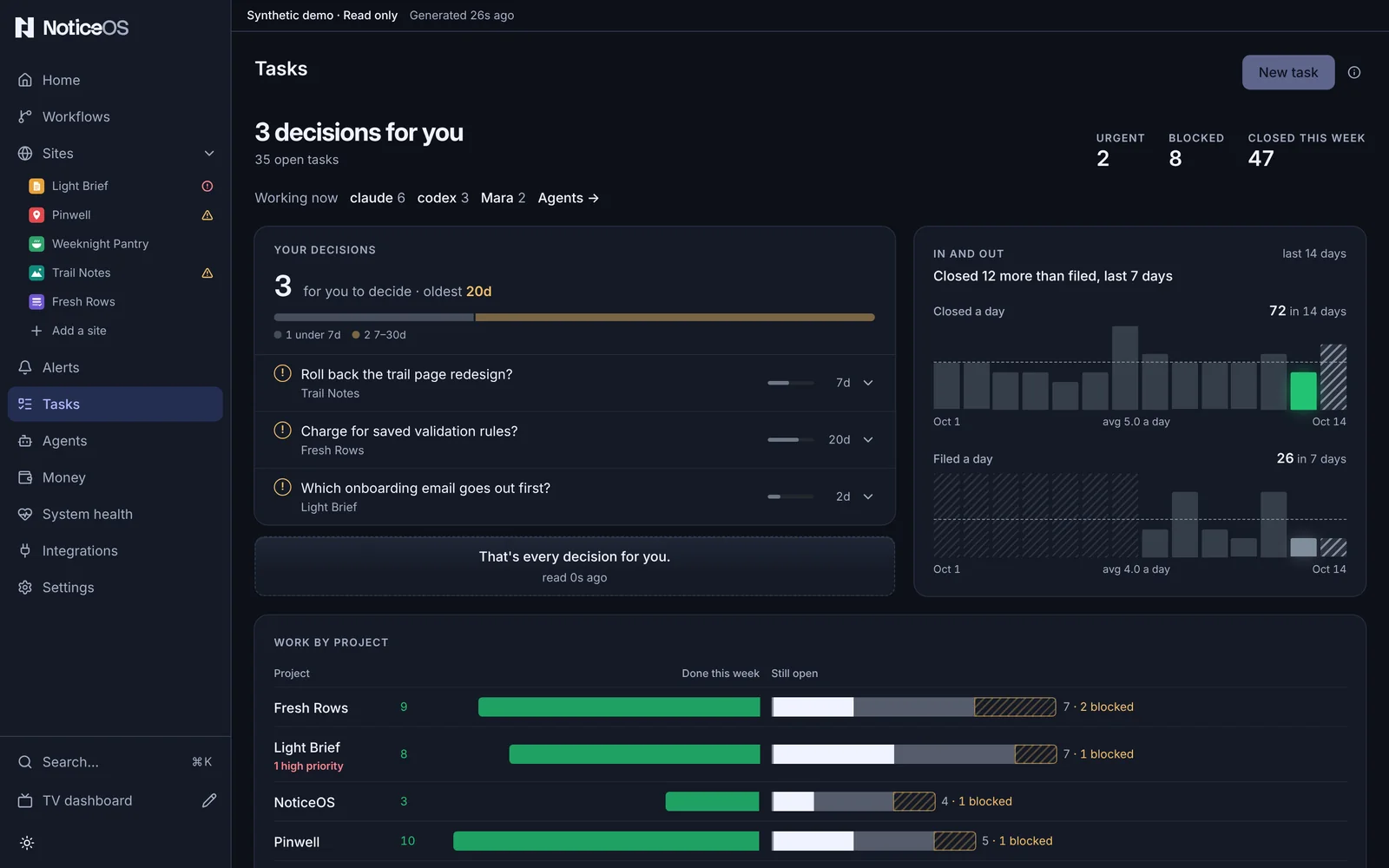
What you see
The page starts with a one-line summary: No decisions for you, or 3 decisions for you, and under it a change chip against a week ago (an arrow, 2 vs a week ago and · 3 added for how many new decisions arrived), 1 needs your approval and how many tasks are open. Three figures follow: Urgent, Blocked and Done this week, each with its change chip: vs a week ago for Urgent and Blocked (the count now against seven days before, with how many entered it), vs last week by today for Done this week (this week so far against last week up to the same day and time). Done this week counts the tasks closed with the resolution Done whose close time falls in this calendar week, Monday to Sunday in the installation's time zone; Done last week counts the same way over the week before. The closes with any other resolution are counted apart beside the figure, such as 3 not done. A figure carries no + for a week still running; 6 days in under In and out is how far the week has run. A figure that did not move shows level with a week ago. More done is green; more decisions, urgent or blocked is red, and the arrow carries the direction without the colour. Urgent and Blocked a week ago come from the task history. Done this week and Done last week are counted from each closed task's own close time and resolution. All of them are the counts the Wall's Work this week shows, whether the board reads the task database live or from the saved snapshot; a board whose history holds no week yet shows the counts it read, with no chips.
Your decisions is the queue: how many decisions are waiting, the oldest one's age, and one bar splitting them by age (under 7 days, 7–30, 30–60, over 60). Each decision is a row with its age drawn as a length and its buttons: Approve for a gate that blocks work until you approve it, Answer or Close as for a question. A question that offers choices shows, under its title, the question and one button per option: the recommended option first, with a star and Recommended, then the others in the order a, b, c, each with its detail under its label. Under the options are Note, Answer and Close as. On a phone the options stack full width. A row's caption names the project and, for a gate, needs your approval, or, for a question with choices, needs your choice. Pressing the row opens its details in place. The queue ends with That's every decision for you.
In and out draws the last 14 days: tasks closed a day and tasks filed a day, each with a dashed line at its daily average, and one line stating whether more tasks were closed or filed over the days both were counted. Today is drawn hatched while it is still being counted. Under the strips, one bar draws Done this week against last week, as the Wall draws it: the bar filled to this week's done, a tick where Done last week by today stood and a thin line at Done last week total, beside how many days into the week today is (6 days in). A second line under the first states how the weeks compare, such as 3 more done this week than last week by today. The strips count every close, whatever its resolution, by its UTC day.
Work by project, when the board shows more than one project, compares each project's week: done this week extending left over last week's done as a dashed outline, still open extending right, split into in progress, ready to start and blocked, with each project's high-priority count under its name.

Epic draws one epic's tasks as a graph: each task in its state (Done, In progress, Ready, Waiting, Blocked, Needs attention, Parked) and an arrow from each task to the task it blocks. An arrow from a blocked or parked task is drawn broken; an arrow from a decision of yours is labelled needs attention. The epic with the most blocked or parked tasks that block other tasks is shown first.
Filters: Project (Every project or one), Status (Any status, then Open, In progress, Blocked, Parked, Closed, last 7 days, each with its count), Priority, Assignee and a label. The filters narrow the list, not the charts above it.
Working now, under the summary, lists who holds tasks in progress and how many each holds, with a link, Agents →, to the Agents page.
All tasks is the table: Id, Project, Who (the agent or person holding it, or nobody), Age and State, and Close as at the end of every row that is not closed, drawn faint until the row is pointed at; on a phone it is inside the opened row. Select sits beside All tasks when two or more rows can be closed. Each row opens its task page at /tasks/<id>, with the full description and the evidence attached when it was closed.
A task's page starts with where the task sits: Tasks, its project and its epic, each a link. Tasks keeps the filters the board had when the task was opened; a page opened from Home or a site also shows Back to Home or Back to site. Over the title are the type (Task, Bug, Feature, Chore, Epic, Decision, or Approval for a task that waits on your approval) and the id, and beside the title is the type's mark. The header of an open bug is tinted in the alert colour; every other header is neutral. Under the title are the state, the priority, who holds the task with the model they named and how long ago they claimed it, an epic's progress, and, for a decision of yours, Needs your approval, Needs your answer or Needs your choice. The actions sit beside the title, the next one first: Approve, or Answer and Close as, for a decision; Claim while nobody holds the task; Close once somebody does. A question with choices shows them directly under the header instead, as its row in Your decisions does: the question, one button per option with the recommended one first, then Note, Answer and Close as. Once an option is chosen, the header shows the choice in its place, such as Chose (b) Redirect to the new page, with who chose it, how long ago and their note, and the options with the chosen one filled and none of them pressable. A closed task shows Close reason directly under the header: who closed it, the model they named, how long ago, and the reason they gave. A task closed with nothing shipped shows its resolution there instead, such as Closed as Won't do, with who closed it, how long ago and their note; Closed as Duplicate of links the other task's page. A decision closed by a choice shows the choice and no Close reason, because its reason is the same words. On a laptop the description, Done when, the tasks it waits on, an epic's tasks and Activity fill the left column, and the facts fill the right: Project, Parent epic, Status, Priority, Assignee, Labels, Parked until, Came from and Ages. On a phone the facts wrap as one row of chips under the header.
A description written in the task guide's labels (WHAT:, WHY:, WHERE:, FIX:, ORDER:, CONSTRAINT: and a ## Steps to Reproduce heading) shows each label over its text; a description without them shows as written. File paths show as code chips, and a task id of a known project links to its page. Done when shows each line that starts with a dash with a box beside it.
When the task waits on other tasks, or other tasks wait on it, a graph shows them: Blocked by on the left, This task in the middle and Blocks on the right, each card in its task's state with an arrow along each link. An arrow from a blocked or parked task is drawn broken, and one from a task in progress moves. Each card opens its task's page.
Activity draws when the task was filed, claimed, commented on and closed on a time axis that ends at Now, then lists the same moments in time order: who did each, with the model they named and their agent's mark, each comment's text, and a close's reason with its commits as chips. A close with nothing shipped reads with its resolution, such as Closed as Won't do by Dana. The comment box is the last item.
An epic's page lists the epic's tasks under Tasks, grouped by the states the Epic graph draws (Needs attention, In progress, Ready, Waiting, Not started, Blocked, Parked, Done) and sorted by priority inside each group. Each row shows the task's state mark, id, title, who holds it with the model they named, and its priority mark, and opens the task's page. The header shows a bar with one segment per task, and 2 of 7 closed: the epic's closed tasks against all its tasks. Closed tasks are filled, a task in progress is half filled, a blocked task is in the warning colour, and a task the page cannot place is hatched. The list holds the tasks closed in the last 7 days; a line under it, such as 3 more, closed over 7 days ago, counts the older ones. Epic graph → opens this page's epic in the Epic graph, and appears only when the board draws a graph for it. A task in an epic shows the same bar under Parent epic, with this task ringed and the first task in the epic that can be claimed now marked with a dot; Next ready:, after the same dot, names that task.
The board works on a new installation because it ships with the System project.
What you can do
- Approve a gate from its row.
- Answer a question: the box opens on the row, you type Your answer and select Send. On a task of type Decision the answer text becomes the note and the task closes. On any other task the answer is added as a comment that starts Answered:, the human label comes off, the assignee is cleared and the task goes back to ready work, where an agent claims it again.
- Close a task with nothing shipped: Close as, on a row in Your decisions or All tasks, lists Won't do, Duplicate, Can't reproduce and Already handled. Picking one opens one line under the row: Note, and for Duplicate first Duplicate of, the other task's id in the same project. Enter or Close task sends it; nobody has to hold the task. The message that follows names it, such as Closed as Won't do, and carries Undo, and the row leaves the list until the Undo window ends. The note becomes the close reason; with no note the reason is the resolution's words, such as Duplicate of ex-a1b. On a question, Close as declines it, as Dismiss did, and records the resolution picked. A duplicate is linked to the other task. Closes with nothing shipped are not counted on Agents.
- Choose an option of a question with choices: press the option's button, on its row or on the task's page. What you type in Note before the press is sent with the choice. The message that follows names the option, such as Chose (b) Redirect to the new page, and carries Undo; until the Undo window ends the page shows the pressed option filled. The choice is recorded on the task with a comment that starts Chose. On a task of type Decision the task closes with the choice as its reason. On any other task the human label comes off, the assignee is cleared and the task goes back to ready work, where an agent claims it again. Answer under the options sends a typed answer instead.
- Decide several at once: Select beside Your decisions puts a checkbox on every row you can answer and shows every row. Tick rows, or Select all, then Approve sends every selected gate, Answer every selected question, and Close as with the count, such as Close 3 as, closes every selected question with one resolution and one note, as described for All tasks below. Each button shows how many rows it sends. Answer leaves out the questions with choices, and the count beside the selection names them, such as 4 selected · 2 need a choice; each of those is chosen on its own row. Close 3 as includes them. One Undo takes the whole batch back. After the Undo window the rows are sent one at a time, and any that are refused are named in a message and return to the queue. Done leaves without sending.
- Close several tasks at once: Select beside All tasks puts a checkbox on every row this workspace can close, and shows every row the filters match. The filters stay in force while you select, so Status: Open, a label and a project, then Select all, ticks exactly the rows they show. Close as with the count, such as Close 3 as, lists Won't do, Duplicate, Can't reproduce and Already handled; a batch never closes as Done. Picking one opens one line under the bar: one Note for every selected task, and for Duplicate first Duplicate of, one task id that every selected task becomes a duplicate of, with the line All 3 become duplicates of this one task, which is rarely right. under it. Enter or Close 3 tasks sends it. The message that follows names the resolution and the count, such as Closed as Already handled · 3, and carries one Undo for every selected task; the rows leave the table until the Undo window ends. Each task then gets the close its row's Close as sends, one at a time. A selected task that is already closed is counted beside the selection, such as 4 selected · 1 closed already, left as it is and named in the message. A task whose close is refused is named in a Not sent message and returns to the table. Done leaves without closing anything. A question waiting on you is listed in Your decisions, not in this table, and is closed from that list's Select.
- Select a project's name in Work by project to narrow the list to it.
- Pick another epic from the list beside Epic; the choice is kept in the page's address. Select a task in the graph to open its page.
- On a task's page, Claim assigns the task to you. Close opens one row of five choices, Done, Won't do, Duplicate, Can't reproduce and Already handled, with Done picked. With Done, What shipped, and the commit takes the reason and Close task closes the task with it. With any other, one line takes a Note, and for Duplicate the other task's id, and Close task sends it with the same Undo a row's close has. When an action cannot run, the reason is written under it, such as Unavailable in this workspace. Edit beside Description or Done when edits it in place, and Comment adds what you type in the comment box.
- Each fact on the right is drawn as its value. Pressing Status, Priority, Assignee or the arrow beside Parent epic opens its choices; Assignee also takes a typed name under Someone else, and Parent epic a task id under Another task id. Parked until offers Tomorrow, In a week, In a month, a date, and Not parked while the task is parked. The dashed Label chip takes a new label, and the × on a label removes it. A choice or Enter saves at once, and the message that follows carries Undo; Escape closes the choices without a change. Where the task cannot be edited, the facts show their values and nothing opens.
- New task opens the composer in place. It has fields for a Title (What should be true when this is done), a Project, a Priority and a Type, with optional Parent epic, Labels, a Description (What, why with the numbers, where) and Done when (The proof that it is done). File task files it.
- File task on a finding, from a site's Overview, opens the same composer prefilled from the finding; the finding then shows a link to the filed task.
- Add a task project, on a site's Tasks tab, opens Settings > Task projects.
Answers and task maintenance
An owner answer applies to the proposal and scope the owner reviewed. An agent can record an existing answer from the task or an explicitly linked conversation with reconcile_task. A short reply such as A or yes, your recommendation selects the matching option. A clear direction is recorded as written. An uncertain reply leaves the decision open for one focused clarification. A batch answer applies only to the tasks the owner named.
An answered question leaves Your decisions. A decision closes; unfinished implementation returns to agent work without the old human label or assignment. The answer does not mark implementation complete. The inbox opens with five decisions and keeps the rest accessible. An open approval appears once for its blocked task; epic containers and recorded choices are excluded.
Agents can retire completed, obsolete, explicitly superseded or duplicate requests with concrete evidence and a plain explanation, or return routine implementation work to agents. History retains the evidence and tasks can be reopened. Retiring an approval grants no permission to perform the action. Production reads and changes, spending, external messages, destructive actions and material business or policy commitments require explicit approval of the specific action and scope.
An agent can release an abandoned assignment after checking that its holder stopped working and preserving its progress. Age alone does not release it. Blocked and parked work retain that state when an assignment is released.
States and labels
- A figure shown as — means the board could not read that project; it is never a zero. The summary line then shows Couldn't read your decisions.
- A count shown as 12+ is a lower bound: a project could not be read, or the snapshot holds only the first items of each list. A lower bound has no change chip.
- The task history counts a day from midnight to midnight UTC. The week starts on Monday in the installation's time zone; a close counts in the week its own close time falls in there.
- On a hosted view the board shows a Read-only snapshot banner: the rows are the last snapshot and the actions are off. Filed a day then shows not in the saved snapshot, and no epic graph is drawn, because the snapshot holds neither filing dates nor dependencies. An epic's page there lists the epic's tasks the snapshot holds and counts the others, such as 4 tasks not in the saved snapshot.
- A hatched day in In and out was not counted. It is never a zero.
- A site with no project of its own shows No task project for this site on its Tasks tab.
Related guides
- Connect a task project
- Tasks and agents
- Home
- How work is filed, verified and closed, in doc 05, Execution, autonomy & accountability